v0.59.B13 · released 17.10.2026
Free network tool for Windows PE · by Holger Kotsch
PE Network Manager
PE Network Manager (PENM) brings networking to Windows PE: it installs the network components and lets you configure adapters, WiFi, network drives, sharing and profiles. It runs in Windows PE projects such as PhoenixPE, c’t Notfall-Windows, LiveXP, Win7PE_SE, Win8.1SE, Win10PE_SE and Win10XPE. Here you’ll find the latest news, downloads and documentation.
// License
PENM is released under a BSD-style license, which is included in the download archives.
The archives also include the AutoIt3 EULA, as PENM is written in the AutoIt3 scripting language.
If you have any questions or suggestions, just let me know.
 News
- Website refresh, the old design was more than 10 years old.
- v0.59 Beta 13 is out.
Over the past few years I have added features, removed some of them temporarily, changed them again and reworked other parts – so if you run into any problems, please let me know. - I’m working on PENM again (Beta 13): bug fixes, extended icons for different screen resolutions and for a dark-style color scheme.
These icons were finished years ago but never released. I’m also experimenting with importing network settings into an ini profile.
I’ll be back in a few days or weeks.
I have also missed quite a few changes on the web over the years: Reboot.pro is no longer available. - I’m currently optimizing the icons for different DPI settings (100% – 300%), so stay tuned for the next release, Beta 13.
- v0.59 Beta 12 released: a quick fix for the empty WiFi list in Beta 11.
News archive (2007 – 2020)
- No new version last year, I’m afraid. I’m currently porting PENM to C++ (again) to make a few things easier for me. Fortunately I don’t have to rewrite everything. The new version will be 0.60 Beta.
It will be closed source but, as I said a few years ago, it will remain freeware.
I’m also considering signing the new version to avoid false-positive alarms. - I’m currently optimizing the icons for different DPI settings (100% – 300%), so stay tuned for the next release, Beta 13.
- v0.59 Beta 12 released: a quick fix for the empty WiFi list in Beta 11.
- Moved to a new hosting and domain provider.
- v0.59 Beta 3 released.
- v0.59 Beta 2 released.
- v0.59 Beta 1 released.
- v0.58.2 final released.
- v0.58.1 final released.
- Updated the dev notes.
- v0.58.B10 (Beta 10) released.
- v0.58.B9 (Beta 9) released.
- v0.58.B8 (Beta 8) released.
- v0.58.B7 (Beta 7) released.
- v0.58.B6 (Beta 6) released.
- Updated the dev notes.
- Updated the dev notes.
- v0.58.B5 (Beta 5) released.
- Updated the dev notes.
- v0.58.B4 (Beta 4) released.
- v0.58.B3 (Beta 3) released.
- v0.58.B2 (Beta 2) released.
- v0.58.B1 (Beta 1) released.
- v0.57.2 released.
- v0.57.1 released.
- v0.57 released.
- Happy New Year! :-)
After a long break I’m releasing the new version v0.57 of PENM.
Just download the version you need (x86 and/or x64).
The WinBuilder scripts will be updated soon.
I know there is still a lot to do and not all problems are solved (e.g. problems with Broadcom adapters).
Older versions of the program are still available in the Downloads section. - I’m back, and work on PENetwork has resumed – stay tuned for news.
- Sorry, no news at the moment – right now I’m just doing a bit of painting for myself.
- v0.60 is still in progress. In the meantime I’m working on v0.57 to fix some bugs; this version should be released soon.
- Another two months have passed… I’m still working on the new version of PENM (v0.60) in C++.
I also found a screenshot of my utility in the German computer magazine “PC-Welt” – nice.
I should also mention that PENM will become freeware starting with v0.60.
For now (at least for the next few years, I think) it will be free – for commercial use, too.
Like many other people, I do this just for fun and to improve my programming skills.
I’m also going to change the layout of this website – a slightly more modern style ;-) - I’m rewriting PENM in C++ (probably as PENetMgr v0.60), so stay tuned…
- Updated “PE Network Manager” to 0.56 – use the script option “Check for newer version of PENM…”.
- New version of PENetwork for VistaPE / Win7PE (v05 Beta), including “PE Network Manager v0.55”.
This will (hopefully) be the last separate version, because I’m working on merging the script versions for LiveXP and VistaPE. - New version of PENetwork for LiveXP (v37), including “PE Network Manager v0.54”.
- New version of PENetwork for LiveXP (v36).
This script includes the new “PE Network Manager v0.53”, which has also been updated as the download for the PE2.1, VistaPE / Win7PE script.
A new v05 Beta for VistaPE / Win7PE is in progress, too.
One of the next script versions will support the most widely used PEs – LiveXP, VistaPE & Win7PE – in a single script. - New version v04 Beta of “PENetwork for VistaPE / Win7PE”.
This version now also works with the new Win7PE.
An updated version for LiveXP and better WiFi usability for PE2.1 are in progress… - PENetwork for LiveXP (v34)
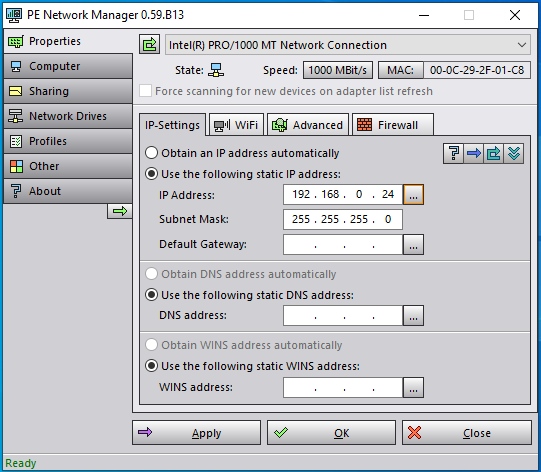
PENetwork for VistaPE (v03 Beta) - Worked on the editor again and made some additions (see the screenshot).
You can now define user accounts that are added after a profile is started.
Next I will add changing the MAC address at startup when a profile is applied. - “PE Network Manager” now basically works under VistaPE (take a look at the screenshot), but it will take some time to finish the editor.
It is now also possible to predefine a MAC address for a profile’s network adapter.
I also reworked some things I had scripted over the last few days, because there were problems under VistaPE.
WiFi support is still in progress. I hope it will be easier under VistaPE thanks to Vista’s built-in Native Wifi, which is more usable and offers far more possibilities. - Back at work – in progress:
* some bug fixing
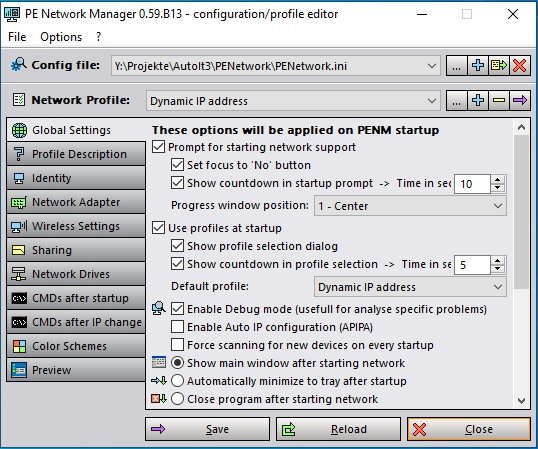
* a new Profile Editor interface (take a quick look at the screenshot) – fully compatible with older profile files, since the save format has not changed
* some additions, e.g. auto-connecting network shares